Download the PDFWhich connection should I use?

Connect your camera

Sony

Alpha and ZV bodies: a7 IV, a7R V, a7C II, a6700, ZV-E10 II and the older a7 III / a6400 generation

The short version

  • Newer bodies (a7 IV onward) pair over Bluetooth through Sony's Creators' App. You can skip pairing and use the hotspot: press the trash button on the connection screen to show the DIRECT-xxxx network.
  • Older bodies (a7 III, a6400, a6600) use Ctrl w/ Smartphone. Hotspot only; no router mode for phones.
  • Over USB, set USB Connection Mode to Remote Shooting (older wording: PC Remote). Mass Storage and MTP only copy files.
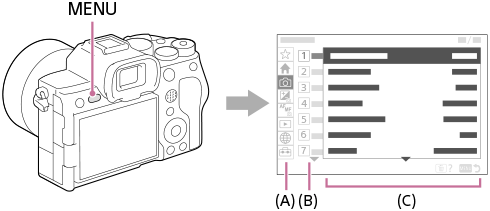
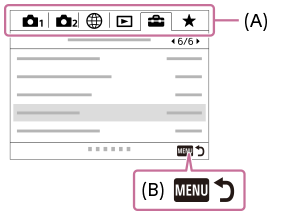
  1. a7 IV: MENU button and the tab layout. The globe is Network.
    a7 IV: MENU button and the tab layout. The globe is Network.
    Source: https://helpguide.sony.net/ilc/2110/v1/en/contents/TP1000640145.html
    a7 III: the older tabbed menu.
    a7 III: the older tabbed menu.
    Source: https://helpguide.sony.net/ilc/1720/v1/en/contents/TP0001653096.html

    Find the Network menu

    MENUNetwork (globe tab)

    Sony's manuals show menus as line drawings, not photos. The pictures on this page are those drawings; the words below are what the screen says.

    On the a7 IV generation the group is called Cnct./Remote Sht. On a6700, a7C II, a7CR, ZV-E1 and ZV-E10 II the same group is Cnct./PC Remote. On the a7 III generation the globe tab holds Ctrl w/ Smartphone directly.
  2. Sony does not publish a picture of the Smartphone Connection screen. The manual gives the path in text.

    Hotspot on newer bodies

    NetworkCnct./Remote Sht.Smartphone Connection

    Open Smartphone Connection. The camera waits for Creators' App over Bluetooth. If you follow the prompts it sets Bluetooth Function to On and the app brings up Wi-Fi later by itself.

    To skip Bluetooth: on that waiting screen press the Delete (trash) button. The camera shows its SSID (DIRECT-xxxx) and password. Join it from the iPhone's Wi-Fi settings.

    The a7 IV needs firmware 2.00 or later for Creators' App. Imaging Edge Mobile no longer works on it after that update.

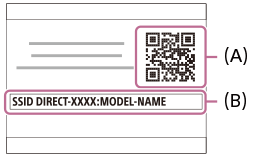
  3. a7 III: the Connection screen. (A) QR code, (B) SSID.
    a7 III: the Connection screen. (A) QR code, (B) SSID.
    Source: https://helpguide.sony.net/ilc/1720/v1/en/contents/TP0001661941.html
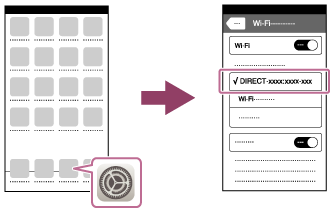
    a7 III manual: picking DIRECT-xxxx in the iPhone's Wi-Fi list.
    a7 III manual: picking DIRECT-xxxx in the iPhone's Wi-Fi list.
    Source: https://helpguide.sony.net/ilc/1720/v1/en/contents/TP0001661941.html

    Hotspot on older bodies

    NetworkCtrl w/ SmartphoneCtrl w/ Smartphone: OnConnection

    Turn Ctrl w/ Smartphone On, then open Connection. The screen shows a QR code and the SSID DIRECT-xxxx.

    On the iPhone, scan the QR code with the Camera app or pick the network under Settings › Wi-Fi and type the password shown. Always Connected keeps the link up between shots.

    These bodies have no router mode for phones. Access Point Set. exists only for sending pictures to a computer.

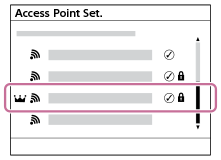
  4. a7 IV: Access Point Set. list. Lock = secured, crown = WPS.
    a7 IV: Access Point Set. list. Lock = secured, crown = WPS.
    Source: https://helpguide.sony.net/ilc/2110/v1/en/contents/TP1000616508.html
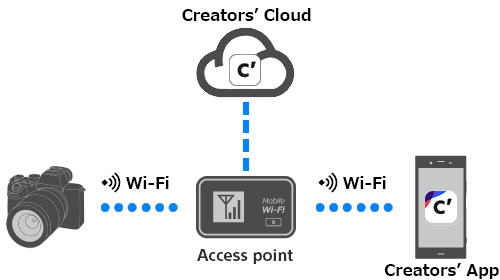
    Creators' App help: camera and phone on the same access point.
    Creators' App help: camera and phone on the same access point.
    Source: https://helpguide.sony.net/di-app/ca/v1/en/contents/CA_ap_connect.html

    Home Wi-Fi on newer bodies

    NetworkWi-FiWi-Fi Connect: OnAccess Point Set.

    Pair over Bluetooth first (step 2). Then register your router under Access Point Set., or hold the router's WPS button and use WPS Push. Set Wi-Fi Connect to On.

    Put the iPhone on the same router. Creators' App then reaches the camera through the router instead of the hotspot, so the phone keeps internet.

  5. Sony's manuals describe USB Connection Mode in text only.

    Or use a USB cable

    SetupUSBUSB Connection ModeRemote Shooting

    Plug a USB-C cable from the camera into the iPhone. On the a7 IV and newer, set USB Connection Mode to Remote Shooting (some firmware calls it PC Remote). Sel. When Connect asks each time. MassStorage and MTP only transfer files. USB Streaming turns the camera into a webcam.

    On the a7 III generation it is Setup › USB Connection › PC Remote. Set Ctrl w/ Smartphone to Off first, or the camera refuses to switch.

    The camera will not accept a PC-style remote session while a phone is connected over Wi-Fi. Disconnect one before starting the other.

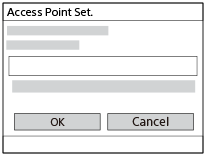
  6. a7 IV: password entry for a router (Access Point Set.).
    a7 IV: password entry for a router (Access Point Set.).
    Source: https://helpguide.sony.net/ilc/2110/v1/en/contents/TP1000616508.html

    Remote Shoot Function (network control)

    NetworkCnct./Remote Sht.Remote Shoot FunctionRemote Shooting: On

    This is the switch that lets a computer-style controller drive the camera over a network. Sub-items: Pairing, Wi-Fi Direct Info. (the camera's own SSID for a direct link) and Access Authen. Info.

    On a1, a9 III and a7R V class bodies there is also PC Remote Cnct Method: USB, Wired LAN, Wi-Fi Direct or Wi-Fi Access Point. Pick the one that matches how you plugged in.

Good to know

Sources

  1. https://helpguide.sony.net/ilc/2110/v1/en/contents/TP1000660160.html (a7 IV, Smartphone Connection, trash button for SSID)
  2. https://helpguide.sony.net/ilc/2110/v1/en/contents/TP1000954814.html and TP1000616508.html (a7 IV, Wi-Fi Connect and Access Point Set.)
  3. https://helpguide.sony.net/ilc/2110/v1/en/contents/TP1000616544.html (a7 IV, USB Connection Mode options)
  4. https://helpguide.sony.net/ilc/2110/v1/en/contents/TP1000656591.html (a7 IV, Remote Shoot Function)
  5. https://helpguide.sony.net/ilc/2320/v1/en/contents/202h_register_smartphone.html and 0903_pc_remote_function.html and 0601_usb_connection.html (a6700 generation wording)
  6. https://helpguide.sony.net/ilc/1720/v1/en/contents/TP0001661963.html, TP0001661941.html, TP0001629775.html (a7 III, Ctrl w/ Smartphone, QR connection, USB Connection)
  7. https://helpguide.sony.net/di-app/ca/v1/en/contents/CA_ap_connect.html, CA_remote_shooting.html, CA_connect_camera.html, CA_usb_connect.html (Creators' App help)
  8. https://support.d-imaging.sony.co.jp/support/cscs/l/iemconnect/7m4/index.php (a7 IV firmware 2.00 and Imaging Edge Mobile)
  9. https://support.d-imaging.sony.co.jp/app/imagingedge/en/instruction/4_1_connection.php (PC Remote Cnct Method)
‹ NikonAll guides ›