Download the PDFWhich connection should I use?

Connect your camera

Nikon

Z series: Z6III, Z8, Z9, Z f, Z50II, Z5II, Z30 and the first-generation Z6, Z7, Z50

The short version

  • Nikon offers both: Wi-Fi connection (AP mode) is the camera hotspot, Wi-Fi connection (STA mode) joins your router.
  • Bluetooth pairing is for SnapBridge and is optional for a Wi-Fi link. If you pair, do both presses quickly; iOS needs Forget This Device before a retry.
  • Over USB the camera speaks MTP/PTP. On Z8, Z f, Z6III and Z5II leave USB on MTP/PTP. The iPhone option is only for Nikon's NX MobileAir app and turns off the camera's network features.
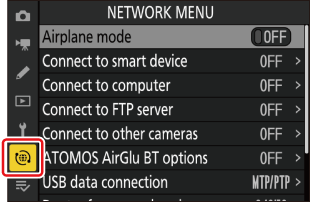
  1. Find the network menu

    MENUnetwork menu (antenna tab)

    Z6III, Z8, Z9, Z f, Z50II, Z5II and Z30 have a dedicated network menu. It holds Connect to smart device, Connect to computer, Connect to FTP server, USB and Airplane mode.

    The 2018–2019 Z6, Z7 and Z50 keep the same items in the SETUP MENU, and call the computer one Connect to PC.
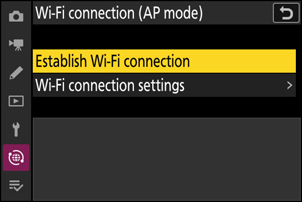
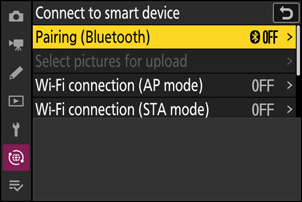
  2. Z6III: Wi-Fi connection (AP mode) › Establish Wi-Fi connection.
    Z6III: Wi-Fi connection (AP mode) › Establish Wi-Fi connection.
    Source: https://onlinemanual.nikonimglib.com/z6III/en/wireless_connections_89.html
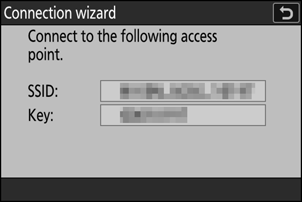
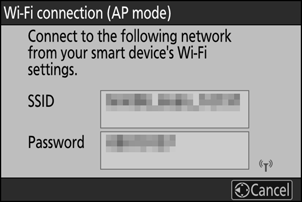
    Z6III: the SSID and password screen (Nikon blurs the values).
    Z6III: the SSID and password screen (Nikon blurs the values).
    Source: https://onlinemanual.nikonimglib.com/z6III/en/wireless_connections_89.html

    Camera hotspot: AP mode

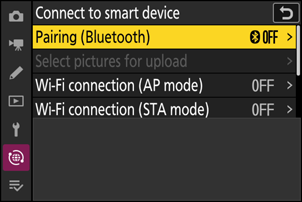
    Connect to smart deviceWi-Fi connection (AP mode)Establish Wi-Fi connection

    The camera shows an SSID and password. On the iPhone open Settings, Wi-Fi, and pick the camera. Type the password. The camera then shows a connection-complete message.

    The phone has no internet while it is on the camera's network. On the first-generation Z50 the item is simply Wi-Fi connection › Establish Wi-Fi connection.

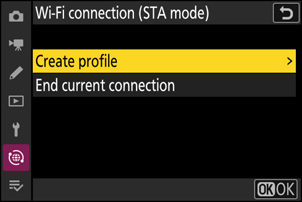
  3. Z6III: Wi-Fi connection (STA mode) › Create profile.
    Z6III: Wi-Fi connection (STA mode) › Create profile.
    Source: https://onlinemanual.nikonimglib.com/z6III/en/wireless_connections_89.html
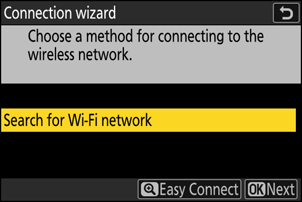
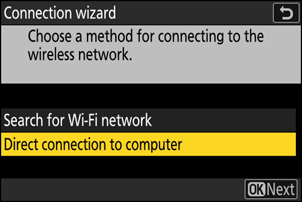
    Z6III: Search for Wi-Fi network in the wizard.
    Z6III: Search for Wi-Fi network in the wizard.
    Source: https://onlinemanual.nikonimglib.com/z6III/en/wireless_connections_89.html

    Home Wi-Fi: STA mode

    Connect to smart deviceWi-Fi connection (STA mode)Create profileSearch for Wi-Fi network

    Name the profile, pick your router from the list (or use WPS), enter the key. The camera remembers the profile.

    Nikon's note: you can only reach smart devices on the same network. Put the iPhone on the same router.

  4. Bluetooth pairing (optional)

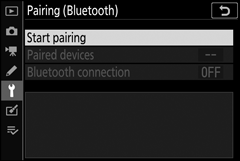
    Connect to smart devicePairing (Bluetooth)Start pairing

    Only needed for SnapBridge-style features. The camera shows its name, the phone shows a code, and you confirm on both. Nikon warns the pairing fails if you wait too long between confirming on the phone and pressing OK on the camera.

    To retry on an iPhone, first open Settings › Bluetooth and Forget This Device. To switch it off later: Pairing (Bluetooth) › Bluetooth connection › OFF.

  5. What 'Connect to computer' is for

    Connect to computerNetwork settingsCreate profileDirect connection to computer

    This route also makes a camera hotspot (the wizard calls it Direct connection to computer) or joins a router (Search for Wi-Fi network). It is built for Nikon's computer software and asks the computer to pair with Nikon's Wireless Transmitter Utility.

    Use it only if an app tells you to. For a phone, the Connect to smart device items above are the normal path.

  6. Nikon's manuals describe the USB menu in text only. No screenshot is offered.

    Or use a USB cable

    network menuUSBMTP/PTP

    Plug a USB-C cable from the camera into the iPhone and turn the camera on.

    Z8, Z f, Z6III and Z5II have a USB item (the Z8 calls it USB Data Connection). Keep it on MTP/PTP. Nikon's own words: the iPhone option 'enables connection only to iPhones running the NX MobileAir app'; it also disables the built-in network functions and USB charging.

    The Z8 has two USB-C ports. Only the data port talks to the phone; the other is power delivery only.

    Z6, Z7 and Z50 have no USB menu. Plug in and go. A separate USB Connection Priority setting (Upload vs Shooting) decides whether the monitor stays on.

Good to know

‹ FujifilmSony ›